Blood Barter
Designer & Programmer
Submitted as solo entry for Discord Jam 8, a 48-hour game jam with the theme “decay”. I decided to focus on narrative and learning the Godot UI system since this was my first time trying Godot. Ranked 69th overall out of 163 entries (view jam submission page).
Features
- Text-based command system - Players interact through pre-programmed text commands, similar to classic text-based games
- Help command - Display a list of actions and their usages at any time during the game
- Atmospheric narrative - Dark, mysterious setting
- Interesting NPCs - Lovingly written NPCs, each with a different personality
- Text decoration - Highlighted, bolded, and animated text to show intractables, items, new locations, and important phrasing
- Location summaries - Summaries of items that can be picked up and possible locations to move to
- History log - Scrollable log of all in-game text
My Contributions
Since this was a solo jam entry, I was responsible for all aspects of development:
- Design - Conceptualized the theme, gameplay, and map
- Programming - Implemented all game logic and systems (e.g., inventory, room map, item usage, etc.) in GDScript
- Narrative - Wrote all story content, NPCs, dialogue, and descriptions
- UI/UX - Designed and implemented the text-based user interface, and added summary and highlighting features for clarity
Design Documentation
Press ` to expand or collapse all sections
Design Process & Rationale
Initial Concept
I like to put a spin on the theme and come up with a less straightforward interpretation when I can. I usually start by pulling up the definition list of the theme and creating a word association map. For this Jam, I was set on making a text-based adventure already since I wanted to focus on improving my writing skills. I also skipped the word association since “decay” immediately made me think of health decay. For me, this naturally applied to decaying aspects of wellbeing while trying to balance goals in life. The night market setting is due to my recent visit to Pike Place market in combination with liking the ambiance of actual night markets.
This game has very informal documentation since it is a solo game jam entry. All of my ideation was done on a single, incomplete markdown file, so I’m writing it up more formally here.
Design Goals
- Create an engaging text-based experience that focuses on player choice
- Explore themes of sacrifice and consequence through gameplay mechanics
- Write fun and interesting NPCs and setting
- Build tension with gradual body-horror implications
Design Challenges
- Learning the Godot UI system was much harder than I anticipated. Thankfully, I was able to find a nice text adventure tutorial by jmbiv after struggling with the Godot docs and implementation myself.
- Working on narrative and writing style was difficult by myself since I don’t often write much for my games. To help with this, I would periodically send pieces fo the writing to my friends for feedback during the jam period
- Unfortunately, I de-prioritized sound design too much and wasn’t able to plan for creating a short background song like I usually do. Instead, I looked through background music on Itch.io and found Cosmic Horror Drones and Melodies by Red Means Recording.
Core Mechanics Breakdown
Command Parser
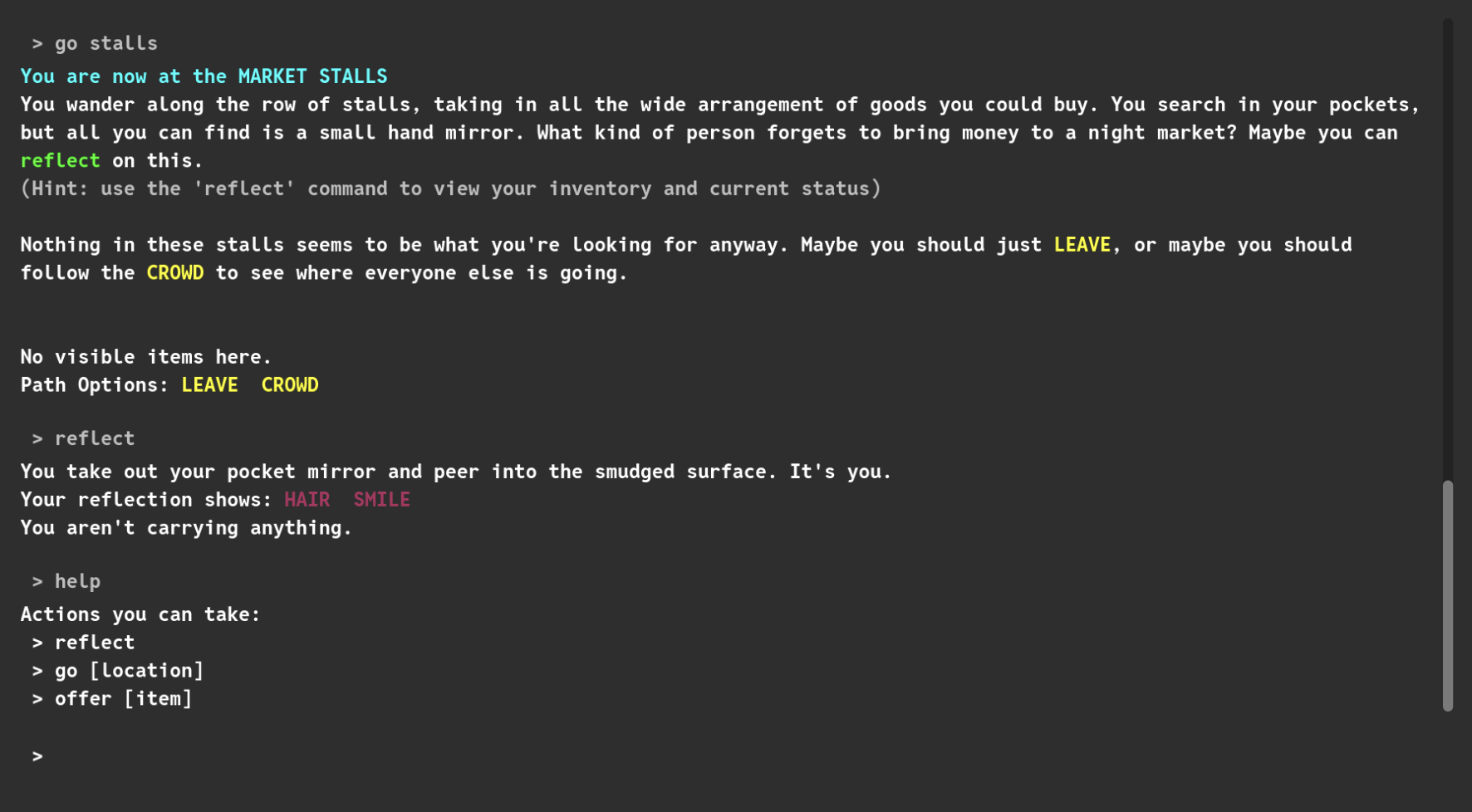
The CommandProcessor takes player input from the front-end using Godot’s UserInput node. It breaks down the input text into words and pattern matches with the available commands (“help”, “offer”, “reflect”, “go”). It throws an error to the player if they input an empty, incomplete, or unrecognized command. This script also contains the implementation for each command, allowing the UI, inventory, and location systems to work in conjunction.
Location Dialogue
Each Location is a generic Control node with a Location script. This script defines a name, a description, all adjacent locations (to travel to), all available items, and a requested item (for trading stalls). It also defines some generic functions to get/set custom text, add/remove items, and add/verify trades.
These custom messages are written in each Location node via the Godot editor. This way, each Location can all share one script for functionality, but have unique text for descriptions, successful trades, and failed trades.
To handle traveling between adjacent locations, adding items, and adding trades, there is a LocationManager script. This script links the Pathways between locations by using the root location’s create_pathway_to_location() method. Pathway is a custom Godot Resource that keeps track of which Locations are linked together and if either end is currently locked (unreachable by the player, allows for one-way pathways). It also defines items and adds trades to each root location using their built in methods add_item_to_location and add_trade_to_location().
Inventory: Items & Body Parts
The inventory utilizes Godot’s Resource to define Item data. The inventory is two Item arrays (one for items and one for body parts) stored in the Player. Both lists can be viewed in-game via the “reflect” command. The Player script also contains functions to add/remove from either array to be utilized by the in-game commands.
Trades & Consequences
Trades are when the player swaps a body part for a merchant’s item. The specific body part they are requesting is hinted at in the merchant’s dialogue when you approach their stall. These trades are defined in the CommandProcessor and are triggered by the “offer” command in-game. The player receives unique dialogue based on if the train was a success or a failure. On a success, the merchant’s item is removed from the location and added to the player’s inventory, while the offered body part is removed from the player.
Player Experience & UX
Onboarding
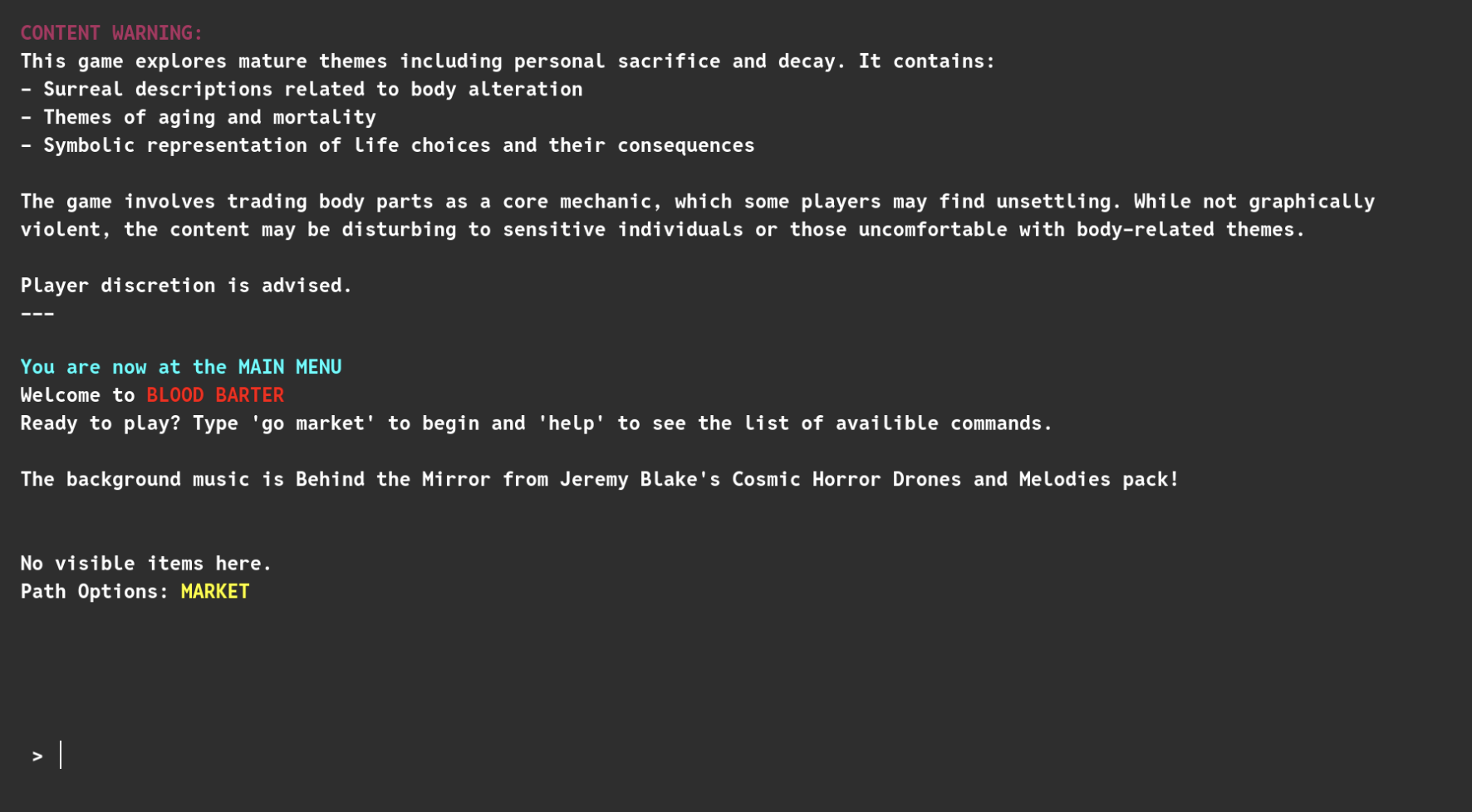
On the opening screen, the player is given a content warning, command for how to start the game, and a hint that the “help” command will show all available commands and their usages (as seen in the Title Screen screenshot). There is also a “How to Play” section on the Itch.io page with the same information.
Upon reflection, this game assumes players are familiar with text-based adventure games or using a command line. This is a fair assumption for the targeted audience, other game developers, but other players may not have this experience so onboarding could be improved by adding a small explanation on how to use the commands and include examples for each one.
Feedback Systems
Pacing
Iteration & Playtesting
What Changed During Development
During the development period, I sent beta versions out friends to playtest, so I was thankfully able to get feedback from other perspectives and iterate quickly. We found sometimes the actions that the player could do weren’t clear, so I added text highlighting with color-coding and a summary for each area that clearly states what items there are and what locations can be traveled to. We also found that just reading the text was a little boring, so I added some animations to some phrases to give the environment and NPCs a little more personality.
For this jam, I had special endings planned to make player choice more impactful. Unfortunately, I did not have enough time to write and implement these, so the player is left with an unsatisfactory vague ending message that prompts reflection on their choices.
Post-Jam Feedback
There was mostly positive feedback for this submission. You can view the full feedback on the Jam submission page.
What I Would Do Differently
Post-jam retro taken from Blood Barter’s itch.io page:
Thank you for taking the time to play my game! This was my first time using Godot so I was doing a lot of learning along the way. Some things I wish I focused more on:
- Endings - I realized I never actually put in an ending, much less the multiple endings I had originally planned for. This makes the game unsatisfying since there isn’t really a stopping point.
- Audio - I wish I had more time to put in some sound effects for the different locations and actions you could take throughout the game!
- Quality of Life - I wanted to put in a settings menu tab on the side to let players increase the font size, change volume, etc. I also thought it would be nice to add a tab completion option for typing the commands.
Overall, I had a lot of fun making this and I hope you enjoy playing! Please leave your feedback in the comments so I can keep improving.